
Live crew map
See your friends as live dots on the map, updated over the mesh as they move.
Funk (radio) + Punkt (dot)
Funkpunkt is an offline map of your crew over Meshtastic radio. See your friends as live dots on the map — at the festival, in the mountains, anywhere there's no signal.
iPhone can't connect to a radio. iOS has no Web Bluetooth or USB, so Funkpunkt needs an Android phone. Grab the app for the Android phone you'll bring:
Download for Android open web app (view-only)Free & open source · No account · No tracking · Works fully offline
What it is
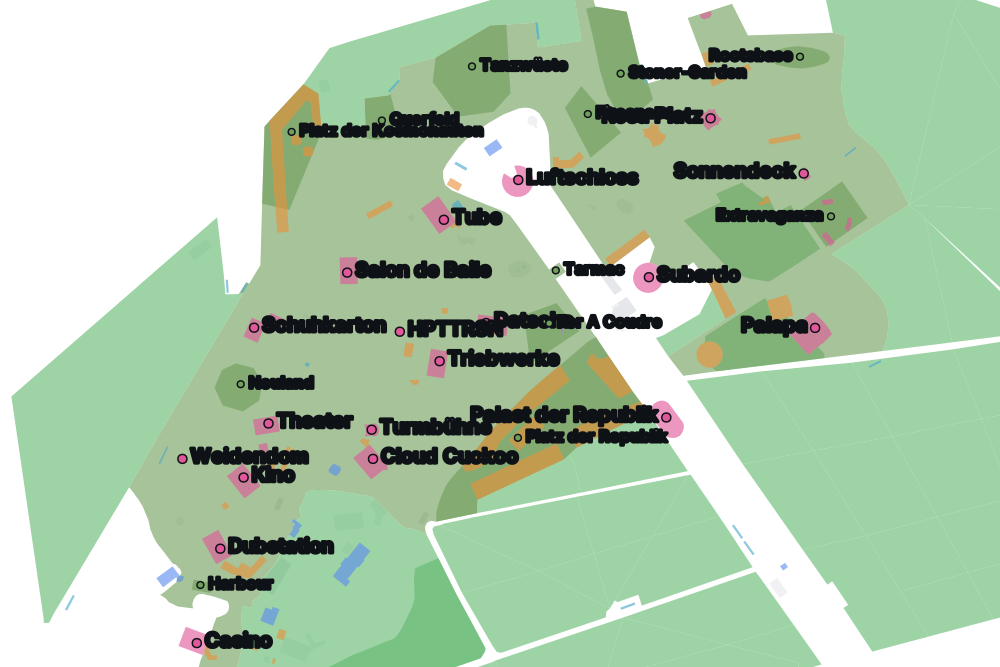
A friend group shares one private Meshtastic channel. Funkpunkt reads each radio's position off that mesh and plots everyone on a self-contained offline map — so you can find your people when there's no phone signal for kilometres. First stop: Fusion Festival 2026, Lärz airfield. Works anywhere off-grid.
See your friends as live dots on the map, updated over the mesh as they move.
A self-built offline basemap ships inside the app. No signal, no data, no problem.
Point-and-distance navigation that walks you straight to anyone in your crew.
Group chat and direct messages on your private channel, no internet needed.
Drop the camp, the meeting spot, the mud field to avoid — shared with the whole crew.
Off by default. Turn it on and only your own path is logged, kept on your phone — never sent over the mesh. It leaves the device only if you export a GPX file yourself.
What you need
Android 8 or newer. iPhones can't connect to a radio (no Web Bluetooth on iOS). A laptop with Chrome works too, over USB.
A Wio Tracker L1, T-Beam, T-Echo or similar. You pair it from inside the app — Funkpunkt only reads its position, it never reconfigures your radio.
A link or QR from your group that puts your radio on the shared private channel. You join it from the app's setup screen after installing.
Funkpunkt isn't on the Play Store — it's a small festival-group app, signed and hosted here. On Android you sideload it: a few extra taps, once. Do this before you leave — there's no signal on site to download it later.
Open this page in Chrome on your phone and tap Download. Chrome warns that "this type of file can harm your device" — tap Keep. It's safe; Android is just cautious about files that didn't come from the Play Store.
Tap the downloaded file. Android says it isn't allowed to install unknown apps from this source — tap Settings, turn on Allow from this source, then go back. You can switch it off again afterwards.
Tap Install. If Play Protect interrupts with "app not scanned", tap Install anyway (or the small Install without scanning link).
Open Funkpunkt and tap Connect. Allow the Nearby devices permission — that's what lets the app talk to your radio. Then join your crew's channel from setup.
No Android phone?
The web app runs in Chrome on a laptop and connects to your radio over USB — handy for setup and testing. On iPhone it can't connect to a radio at all (iOS has no Web Bluetooth or Web Serial), so for the festival you'll want an Android phone: the app holds the radio link in the background, which a browser tab can't.